Convert Rainbow Table Between .rt and .rtc File Format
This document is for RainbowCrack 1.6.1. Exact command line syntax for later versions of RainbowCrack software is a little different. But the general procedure is same.
Introduction
This document explains the rt2rtc and rtc2rt programs.
- The rt2rtc program converts rainbow table from .rt format to .rtc format.
- The rtc2rt program converts rainbow table from .rtc format to .rt format.
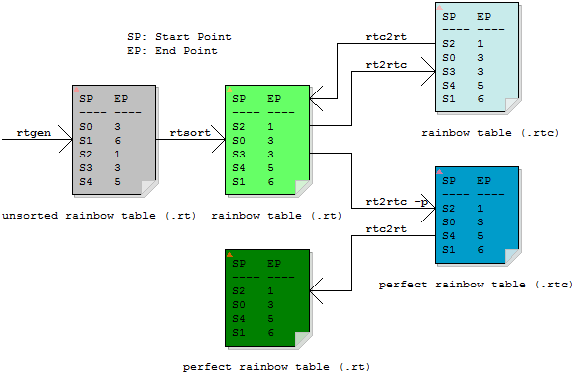
Rainbow Table Conversion
The .rtc rainbow table can be considered as compressed version of .rt rainbow table. As rainbow table must be loaded from hard disk to memory to lookup, smaller rainbow table reduces overall table lookup time.
The rcrack program supports rainbow table in both .rt (must be sorted) and .rtc formats.
Convert Rainbow Table from .rt Format to .rtc Format
Basic Use
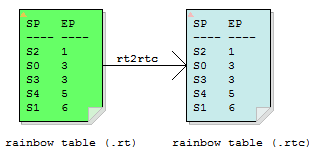
The rt2rtc program converts rainbow table from .rt file format to .rtc file format.
Command line syntax of rt2rtc program:
rt2rtc rt_files start_point_bits end_point_bits [-m chunk_size_in_mb] [-p]
The "rt_files" parameter specifies the rainbow tables to be converted (e.g., "c:\rt\*.rt").
The "start_point_bits" and "end_point_bits" parameters are numbers. They specify how many bits are used to encode the start point and end point of each rainbow chain.
Rainbow tables in .rt file format always use 64 bits to store the start point and 64 bits for the end point. Each rainbow chain requires 64 bits + 64 bits = 128 bits = 16 bytes.
With the .rtc file format, number of bits that is used to store the start point and end point is configurable.
As an example, we convert the rainbow table "md5_loweralpha-numeric#1-7".
Input files:
536,870,912 md5_loweralpha-numeric#1-7_0_3800x33554432_0.rt 536,870,912 md5_loweralpha-numeric#1-7_1_3800x33554432_0.rt 536,870,912 md5_loweralpha-numeric#1-7_2_3800x33554432_0.rt 536,870,912 md5_loweralpha-numeric#1-7_3_3800x33554432_0.rt 536,870,912 md5_loweralpha-numeric#1-7_4_3800x33554432_0.rt 536,870,912 md5_loweralpha-numeric#1-7_5_3800x33554432_0.rt
Example command line and program output:
D:\rainbowcrack>rt2rtc *.rt 25 31 converting md5_loweralpha-numeric#1-7_0_3800x33554432_0.rt to md5_loweralpha-numeric#1-7_0_3800x?_0.rtc... minimal value of start_point_bits is 25 minimal value of end_point_bits is 25 converting md5_loweralpha-numeric#1-7_1_3800x33554432_0.rt to md5_loweralpha-numeric#1-7_1_3800x?_0.rtc... minimal value of start_point_bits is 25 minimal value of end_point_bits is 25 converting md5_loweralpha-numeric#1-7_2_3800x33554432_0.rt to md5_loweralpha-numeric#1-7_2_3800x?_0.rtc... minimal value of start_point_bits is 25 minimal value of end_point_bits is 26 converting md5_loweralpha-numeric#1-7_3_3800x33554432_0.rt to md5_loweralpha-numeric#1-7_3_3800x?_0.rtc... minimal value of start_point_bits is 25 minimal value of end_point_bits is 25 converting md5_loweralpha-numeric#1-7_4_3800x33554432_0.rt to md5_loweralpha-numeric#1-7_4_3800x?_0.rtc... minimal value of start_point_bits is 25 minimal value of end_point_bits is 25 converting md5_loweralpha-numeric#1-7_5_3800x33554432_0.rt to md5_loweralpha-numeric#1-7_5_3800x?_0.rtc... minimal value of start_point_bits is 25 minimal value of end_point_bits is 25
Output files:
234,881,056 md5_loweralpha-numeric#1-7_0_3800x33554432_0.rtc 234,881,056 md5_loweralpha-numeric#1-7_1_3800x33554432_0.rtc 234,881,056 md5_loweralpha-numeric#1-7_2_3800x33554432_0.rtc 234,881,056 md5_loweralpha-numeric#1-7_3_3800x33554432_0.rtc 234,881,056 md5_loweralpha-numeric#1-7_4_3800x33554432_0.rtc 234,881,056 md5_loweralpha-numeric#1-7_5_3800x33554432_0.rtc
The rt2rtc program read the .rt rainbow tables one by one and write the .rtc rainbow tables to the current directory.
If the "start_point_bits" or "end_point_bits" parameter specified on the command line is too small, error message is reported with suggested value of these parameters. Any outputted .rtc rainbow tables should be deleted manually in this case.
The -m Option
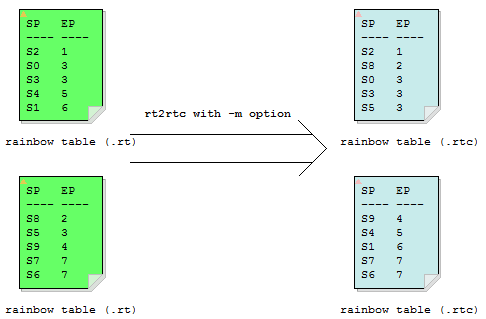
We use an example to illustrate the -m option of rt2rtc program.
There are 128 .rt files in rainbow table set md5_ascii-32-95#1-7:
1,073,741,824 md5_ascii-32-95#1-7_10_71000x67108864_10.rt 1,073,741,824 md5_ascii-32-95#1-7_10_71000x67108864_11.rt 1,073,741,824 md5_ascii-32-95#1-7_10_71000x67108864_12.rt 1,073,741,824 md5_ascii-32-95#1-7_10_71000x67108864_13.rt 1,073,741,824 md5_ascii-32-95#1-7_10_71000x67108864_14.rt 1,073,741,824 md5_ascii-32-95#1-7_10_71000x67108864_15.rt 1,073,741,824 md5_ascii-32-95#1-7_10_71000x67108864_16.rt 1,073,741,824 md5_ascii-32-95#1-7_10_71000x67108864_17.rt 1,073,741,824 md5_ascii-32-95#1-7_10_71000x67108864_18.rt 1,073,741,824 md5_ascii-32-95#1-7_10_71000x67108864_19.rt 1,073,741,824 md5_ascii-32-95#1-7_10_71000x67108864_20.rt 1,073,741,824 md5_ascii-32-95#1-7_10_71000x67108864_21.rt 1,073,741,824 md5_ascii-32-95#1-7_10_71000x67108864_22.rt 1,073,741,824 md5_ascii-32-95#1-7_10_71000x67108864_23.rt 1,073,741,824 md5_ascii-32-95#1-7_10_71000x67108864_24.rt 1,073,741,824 md5_ascii-32-95#1-7_10_71000x67108864_25.rt 1,073,741,824 md5_ascii-32-95#1-7_12_71000x67108864_10.rt ... 1,073,741,824 md5_ascii-32-95#1-7_12_71000x67108864_25.rt ... ... 1,073,741,824 md5_ascii-32-95#1-7_24_71000x67108864_10.rt ... 1,073,741,824 md5_ascii-32-95#1-7_24_71000x67108864_25.rt
The first 16 files (i.e., md5_ascii-32-95#1-7_10_*.rt) with table index 10 logically belong to single rainbow table, though they are physically stored in different files.
If the rt2rtc program is run without -m option, all input rainbow tables are converted individually. If the -m option is used rainbow chains in first 16 files are combined and treated as a single rainbow chain array before converting.
Example command line and program output:
D:\rainbowcrack>rt2rtc.exe d:\rt_md5_ascii-32-95#1-7\* 30 34 -m 8192 following rainbow tables will be combined and converted: d:\rt_md5_ascii-32-95#1-7\md5_ascii-32-95#1-7_10_71000x67108864_10.rt d:\rt_md5_ascii-32-95#1-7\md5_ascii-32-95#1-7_10_71000x67108864_11.rt d:\rt_md5_ascii-32-95#1-7\md5_ascii-32-95#1-7_10_71000x67108864_12.rt d:\rt_md5_ascii-32-95#1-7\md5_ascii-32-95#1-7_10_71000x67108864_13.rt d:\rt_md5_ascii-32-95#1-7\md5_ascii-32-95#1-7_10_71000x67108864_14.rt d:\rt_md5_ascii-32-95#1-7\md5_ascii-32-95#1-7_10_71000x67108864_15.rt d:\rt_md5_ascii-32-95#1-7\md5_ascii-32-95#1-7_10_71000x67108864_16.rt d:\rt_md5_ascii-32-95#1-7\md5_ascii-32-95#1-7_10_71000x67108864_17.rt d:\rt_md5_ascii-32-95#1-7\md5_ascii-32-95#1-7_10_71000x67108864_18.rt d:\rt_md5_ascii-32-95#1-7\md5_ascii-32-95#1-7_10_71000x67108864_19.rt d:\rt_md5_ascii-32-95#1-7\md5_ascii-32-95#1-7_10_71000x67108864_20.rt d:\rt_md5_ascii-32-95#1-7\md5_ascii-32-95#1-7_10_71000x67108864_21.rt d:\rt_md5_ascii-32-95#1-7\md5_ascii-32-95#1-7_10_71000x67108864_22.rt d:\rt_md5_ascii-32-95#1-7\md5_ascii-32-95#1-7_10_71000x67108864_23.rt d:\rt_md5_ascii-32-95#1-7\md5_ascii-32-95#1-7_10_71000x67108864_24.rt d:\rt_md5_ascii-32-95#1-7\md5_ascii-32-95#1-7_10_71000x67108864_25.rt writing md5_ascii-32-95#1-7_10_71000x536870912_0.rtc... minimal value of start_point_bits is 30 minimal value of end_point_bits is 32 writing md5_ascii-32-95#1-7_10_71000x536870912_1.rtc... minimal value of start_point_bits is 30 minimal value of end_point_bits is 32 following rainbow tables will be combined and converted: d:\rt_md5_ascii-32-95#1-7\md5_ascii-32-95#1-7_12_71000x67108864_10.rt d:\rt_md5_ascii-32-95#1-7\md5_ascii-32-95#1-7_12_71000x67108864_11.rt d:\rt_md5_ascii-32-95#1-7\md5_ascii-32-95#1-7_12_71000x67108864_12.rt d:\rt_md5_ascii-32-95#1-7\md5_ascii-32-95#1-7_12_71000x67108864_13.rt d:\rt_md5_ascii-32-95#1-7\md5_ascii-32-95#1-7_12_71000x67108864_14.rt d:\rt_md5_ascii-32-95#1-7\md5_ascii-32-95#1-7_12_71000x67108864_15.rt d:\rt_md5_ascii-32-95#1-7\md5_ascii-32-95#1-7_12_71000x67108864_16.rt d:\rt_md5_ascii-32-95#1-7\md5_ascii-32-95#1-7_12_71000x67108864_17.rt d:\rt_md5_ascii-32-95#1-7\md5_ascii-32-95#1-7_12_71000x67108864_18.rt d:\rt_md5_ascii-32-95#1-7\md5_ascii-32-95#1-7_12_71000x67108864_19.rt d:\rt_md5_ascii-32-95#1-7\md5_ascii-32-95#1-7_12_71000x67108864_20.rt d:\rt_md5_ascii-32-95#1-7\md5_ascii-32-95#1-7_12_71000x67108864_21.rt d:\rt_md5_ascii-32-95#1-7\md5_ascii-32-95#1-7_12_71000x67108864_22.rt d:\rt_md5_ascii-32-95#1-7\md5_ascii-32-95#1-7_12_71000x67108864_23.rt d:\rt_md5_ascii-32-95#1-7\md5_ascii-32-95#1-7_12_71000x67108864_24.rt d:\rt_md5_ascii-32-95#1-7\md5_ascii-32-95#1-7_12_71000x67108864_25.rt writing md5_ascii-32-95#1-7_12_71000x536870912_0.rtc... minimal value of start_point_bits is 30 minimal value of end_point_bits is 32 writing md5_ascii-32-95#1-7_12_71000x536870912_1.rtc... minimal value of start_point_bits is 30 minimal value of end_point_bits is 32 ... ...
Output files:
4,294,967,328 md5_ascii-32-95#1-7_10_71000x536870912_0.rtc 4,294,967,328 md5_ascii-32-95#1-7_10_71000x536870912_1.rtc 4,294,967,328 md5_ascii-32-95#1-7_12_71000x536870912_0.rtc 4,294,967,328 md5_ascii-32-95#1-7_12_71000x536870912_1.rtc 4,294,967,328 md5_ascii-32-95#1-7_14_71000x536870912_0.rtc 4,294,967,328 md5_ascii-32-95#1-7_14_71000x536870912_1.rtc 4,294,967,328 md5_ascii-32-95#1-7_16_71000x536870912_0.rtc 4,294,967,328 md5_ascii-32-95#1-7_16_71000x536870912_1.rtc 4,294,967,328 md5_ascii-32-95#1-7_18_71000x536870912_0.rtc 4,294,967,328 md5_ascii-32-95#1-7_18_71000x536870912_1.rtc 4,294,967,328 md5_ascii-32-95#1-7_20_71000x536870912_0.rtc 4,294,967,328 md5_ascii-32-95#1-7_20_71000x536870912_1.rtc 4,294,967,328 md5_ascii-32-95#1-7_22_71000x536870912_0.rtc 4,294,967,328 md5_ascii-32-95#1-7_22_71000x536870912_1.rtc 4,294,967,328 md5_ascii-32-95#1-7_24_71000x536870912_0.rtc 4,294,967,328 md5_ascii-32-95#1-7_24_71000x536870912_1.rtc
Each 8192 MB .rt rainbow table is converted to one .rtc rainbow table. The chunk_size_in_mb parameter determines size of each .rtc rainbow table.
All rainbow chains in original .rt rainbow tables are retained in outputted .rtc rainbow tables when converting with -m option.
The -p Option: Convert to Perfect Rainbow Table
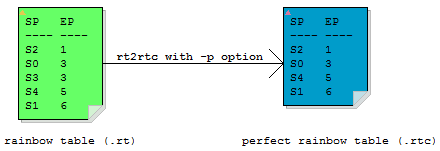
Perfect rainbow table is the rainbow table without identical end points.
Rainbow chain merging is unavoidable when generating rainbow tables, causing rainbow chains with identical end points.
When rt2rtc program is run with -p option, those additional rainbow chains with identical end points are discarded.
The success rate contribution per rainbow chain is higher with perfect rainbow table. However, as more rainbow chains are discarded more table generation effort is wasted which is very expensive.
When -p option is used, we also suggest the -m option, though this is not required.
Convert Rainbow Table from .rtc Format to .rt Format
The rtc2rt program converts rainbow table from .rtc file format to .rt file format.
Command line syntax of rtc2rt program:
rtc2rt rtc_files
To convert all rainbow tables in current directory from .rtc to .rt format:
rtc2rt *.rtc
Rainbow table can be converted form .rt format to .rtc format, and then back to .rt format. The final .rt tables as outputted by rtc2rt program should be binary identical with original .rt tables, as long as the -m or -p option is not used in rt2rtc program.
© 2020 RainbowCrack Project